Thread #1023792 | Image & Video Expansion | Click to Play

File: FF12(2).png (53.2 KB)
53.2 KB PNG
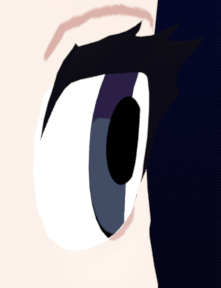
Any eye rig setups that address the issue of clipping once the cornea goes too far to a side?
https://files.catbox.moe/0yac70.webm
11 RepliesView Thread
 Showing all 11 replies.
>>
>>
>>
>>
>>
>>1023845
Isn't automation a rigger's job? What would manual labor entail in this situation?
Are you talking about creating a shapekey/blendshape for the iris to deform whenever viewed from the side so as to prevent clipping? That's the only thing I can think of, otherwise I'm not sure how blendshapes would solve problem.
>>
>>
>>1023846
Don't listen to the other idiot. That being said, ideally you want to be reasonable as to what you automate. Like automating some morph for the eye is overkill compared to just modeling the eye in a way that will not break down in the first place. Also since they're such simple shapes, basically two circles you could weight the outside of the iris to a bone and the inside to another and then it's super easy to adjust, and if you really need some sort of shortcut you can put an arrangement that looks good from the side in the pose library, rather than drvie a whole automation.
Fancy rig features should be driven by what the rig's gonna be used for, make it easy to reach a good pose fast in most common situation. But good modeling will get you most of the way there
>>
>>1023848
How would you model the eye to prevent facial clipping from the side while looking good from the front?
Since it’s just a disc, once it moves enough to the side, it’ll naturally collide with the face in such a way that will look bad from the side unless shrinked/deformed in some way, I’m not sure of any other solution
I don’t know how weighting the iris’ inside and outside different would solve the problem, since it’s only the outside that’s the issue
The pose library idea is probably the most realistic
>>
>>
>>
File: Screenshot 2025-12-28 143002.jpg (196.9 KB)

196.9 KB JPG
you can just use a shrinkwrap modifier. and make the iris/pupil mesh a separate object with a shrinkwrap constraint on the object itself, pinned to the eyeball mesh. to keep it from floating away from the eye. and then parenting the iris/pupil meshes to bones. align the normal of the bone to point directly away from the eyeball mesh and then put another shrinkwrap constraint on the bone. i can demonstrate the effect if you need.
this stacking of shrinkwrap modifiers and shrinkwrap constraints allows for any shape of iris/pupil onto any shape eyeball/sclera smoothly and without using blendshapes.
but of course, this will only work inside of blender though, and isnt exportable.
The pupil should be shrinkwrapped to the iris. and the iris shouldbe shrinkwrapped to the sclera. and each mesh should have enough geometry
Set shrinkwrap modifier to Nearest Surface Point and Above Surface with a very very very tiny offset to avoid Z fighting.