Thread #993096 | Image & Video Expansion | Click to Play

File: 3D Max.png (2 KB)

2 KB PNG
Reminder: Subscriptions SUCK!
Have a 3Ds Max/Maya question? recently started a project? Or simply want to complain about Maya crashing?
Previous thread: >>
185 RepliesView Thread
 Showing all 185 replies.
>>
File: WipWireframe.png (123.7 KB)

123.7 KB PNG
>>993096
Advice would be welcome.
>>

>>
>>
>>
File: script.png (2 MB)

2 MB PNG
This is a huge longshot, but does anyone have the braid/spiral creation script for Maya? It was on highend3d but the site has been down for 6 months with no telling when it'll come up. The script was EXTREMELY useful for creating fast nice looking braids to use with modeling or xgen.
>>
>>
>>
>>
>>
>>

>>

>>
>>
>>
>>
>>
File: bitmap processor.png (14.8 KB)
14.8 KB PNG
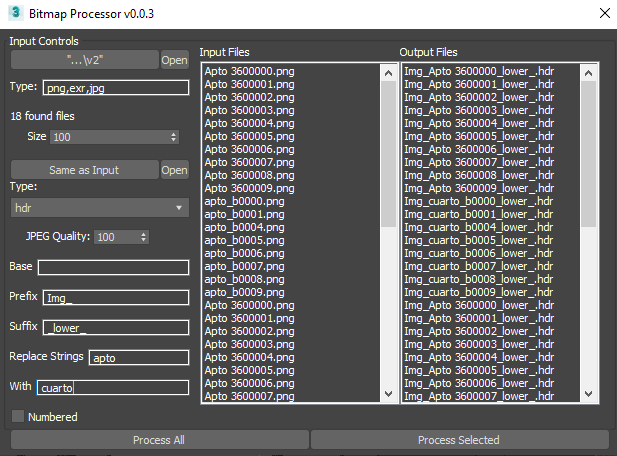
Script for free I made today to rename a bunch of shit i had in the same folder.
https://3chan.s3.us-east-2.amazonaws.com/Bitmap%20Processor.ms
>>
>>
>>

>>

>>
>>
>>
>>
>>
File: smarty extrude.webm (279.7 KB)

279.7 KB WEBM
>>993502
The smart extrude algorithm initiates the boolean operation only on the faces that contact the surface first, by making it planar you are forcing the program to take all faces into account.
>>
File: file.png (1.3 MB)

1.3 MB PNG
trying to make an ISU 152 gun mantlet but cant do it merging 2 primitives (cylinder & chamfered box)
should I switch to paneling?
reference I want to achieve
https://www.artstation.com/artwork/Kr5w1R
>>
File: Tank Front Example.webm (1.5 MB)

1.5 MB WEBM
>>993517
Cute. This reminds me of my first 3d model of a mustang I tried to make using only boolean because I had no idea of hard surface modelling.
You must get into poly modeling if you want to achieve reference.
>>
File: Tank Front Example.webm (3.7 MB)

3.7 MB WEBM
Better kbps
>>
File: mesh.png (3.2 KB)

3.2 KB PNG
>>993363
Use smooth modifier with value 35
>>993098
Mesh is having trouble maintaining circularity in this spot because you have an unbalanced loop. Cylinders are tricky because the only good wat to maintain a perfect circular shape is to subd the whole circumference in regular loops.
>>
>>
File: save ass jaypeg.jpg (80.6 KB)

80.6 KB JPG
total noob here
my fat monkey fingers hit something and now the left cone is retarded. What did I do? Ctrl + Z doesn't work.
>>
>>
>>
File: 1725212412308045.jpg (147.1 KB)

147.1 KB JPG
>>993096
I’m learning Maya so I can create some game assets. It’s so frustrating how much better the Blender tutorials are on YouTube though. Most of the Maya tutorials are done by pajeets with awful microphones and bad instructions. Does anyone know of any channels that have higher quality stuff in regards to Maya? So far GameDevAcademy's 4 hour intro video has been really good but I'm struggling to find more of that level of quality.
>>
File: 4432343.jpg (53.8 KB)

53.8 KB JPG
When applying texture to this wall it overlaps onto the window, is there a way to remove the overlapping section?
>>
>>994086
It's not a texture it's a triangulation problem.
Convert to edit poly > select wall face > retriangulate.
If problem persists retriangulate manually.
If problem persists use optimize modifier with auto edge.
>>
File: Triangulation.webm (2.5 MB)

2.5 MB WEBM
>>994086
>>994088
Max sometimes goes crazy when a square whole is made onto a square polygon and it has no edges because it creates non conforming triangulation.
>>
File: render2.jpg (94.6 KB)

94.6 KB JPG
>>994088
>>994090
I should've specified my b, this is in Maya. I "fixed" it by just not applying texture to the outer wall. Seems like if I apply the texture to the outside then the overlapping happens (although it only shows up when rendering the image).
Is there a similar re-triangulate setting in Maya?
>>
>>994093
>Maya
This is why an autodesk general doesnt work because autodesk programs are alien to eachother.
If this is something happening in the arnold buffer you should shack your mesh settings. My vague memory tells me there is a quad split option in the mesh settings.
This will prevent unwanted rendertime retriangulation.
>>
>>

>>
>>
>>
>>
File: rendertest.jpg (83.5 KB)
83.5 KB JPG
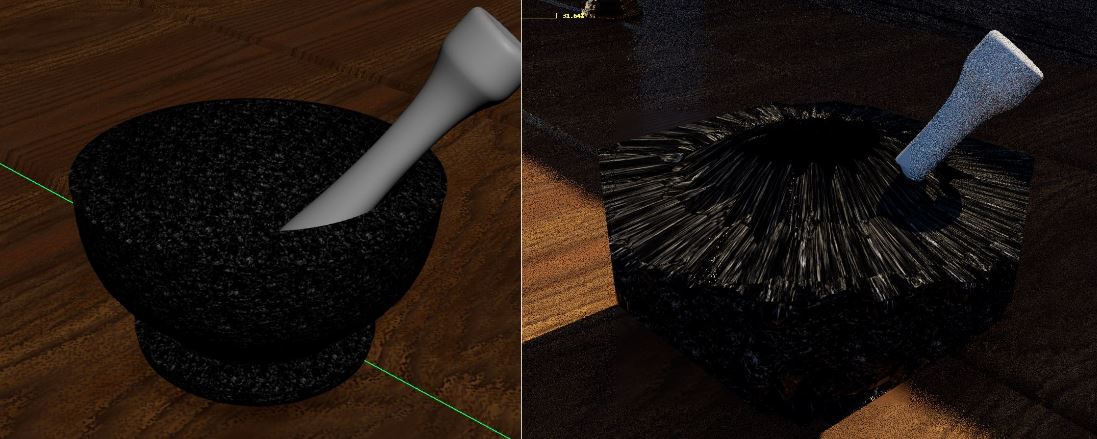
I'm getting really weird distortions on this bowl when I render it w/ Arnold after applying a texture. I suspect something wrong with the UV mapping?
>>

>>
>>994186
Yes, the UV bow should not be rounded, it needs to stay in squares or at very least close to how you would draw it. One of the bows is out of bounds so that is why you get that render. Lastly, the UV camera angle needs a lot of work.
I don’t know if it’s me or what but did you super size the UVs to unreasonable levels? Also why EXR format, you can use png or other photo formats that can capture the roughness of the model. What have you been doing…
>>
>>994196
The texture is 4k so I have to increase the size of the UVs so that it doesn’t look blurry, I probably overdid it though as you mentioned it’s out of bounds.
I just snapped a pic using snipping tool which is why it’s a jpg
>>
>>994205
No one ever told you that using outside tiles is just a repeat of the original 4K. This is why everything is only in block1 and only rarely would anyone use outside block2 or 4. The size of material won’t matter much unless you want it to be super detailed. The UV cameras and UV shapes are the thing you need to fix.
>>
>>
>>
>>
File: IMG_9607.jpg (54.9 KB)

54.9 KB JPG
>>993096
Are there any good (free or paid) mech tutorials?
>>
File: stolen model.webm (3.9 MB)

3.9 MB WEBM
Retard here. Could you guys point me in the right direction with Fusion 360? Took this model from the internet but I need to shorten the distance between these two big bolt holes and 3D print it. I can cut it in the slicer obviously, but it wont keep the same curve going down to the second bolt hole. Surely there's some tool that can do this.
>>
File: Capture.png (414.2 KB)

414.2 KB PNG
>>994624
Man fuck this shit I'm gonna learn how to make my own and do it from scratch and make it better.
>>
File: Maya Bevels.png (21.3 KB)
21.3 KB PNG
>>994535
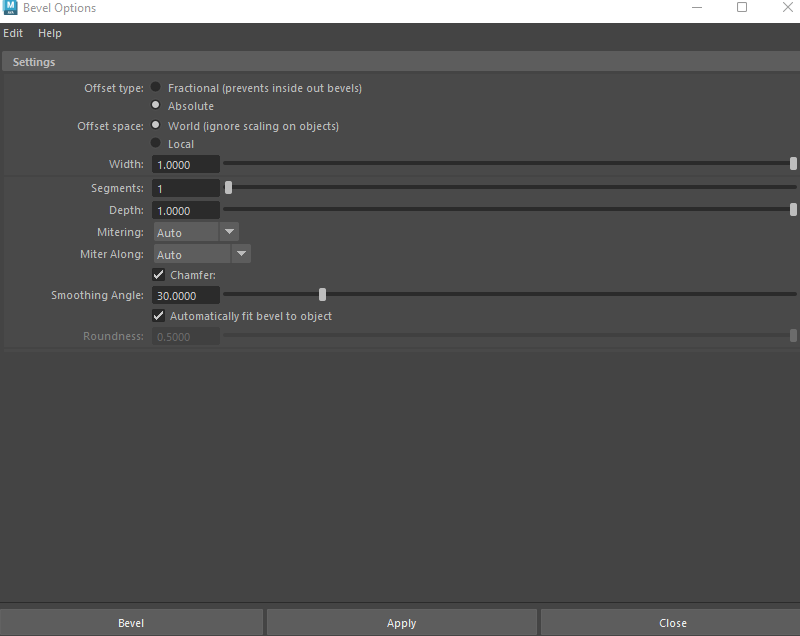
Let me guess you found that you've been using the bevel tool incorrectly and you should be doing it with offsets instead of fractions?
>>994624
https://discord.gg/Dayy7kFgJG read the rules and pass the botcheck then go to #3d-faq-frequently-asked-questions some autistic on their server assumable an encyclopedia of beginner tutorials.
>>
>>
>>994624
so working with stls in fusion kidna sucks but its doable. You want to select all of the tris in the holle and the bevel and just delete them, then fill it.
Also, its probably smart to convert the model before you do anything. its been a while but i remember doing the same shit with models in the past.
Or jsut rebuild it like you were thinking about, thats a pretty good model to learn from replicating
>>
>>
>>
>>
>>
>>
>>
>>995340
>>995367
Blender can’t handle millions of polygons even with higher graphics cards. It doesn’t offer symmetry or auto repto. Only dumb people would continue to use ancient methods that takes days to complete a model vs another software like Wings3D that just works.
Also, maya’s UV editing offers more opportunities to create it for many studios compared to Blender’s backwater of UV editing. Wings3D is obviously better too because it’s designed to get simple UV to work.
>>
>>995377
I dunno what you're doing that makes it unable to handle 'millions' of polygons because I routinely make models that go over 10 million by the end of the project.
Also why would you ever suggest Wings3D? That program is dogwater shit I first learned 3D with. Never suggest it as a serious tool.
>>
File: 1700655499853356.png (1.6 MB)

1.6 MB PNG
>>994187
dummy this is 101 of UV texturing, you need to work in the small square, ZOOM the UV until you see ONE square and packaged everything around it, this is hilariously bad but dont worry, one time mistake, promise?
>>
>>
What CPU should I get for Autoshit Revit, working on massive bloated projects with arch and MEP and my 5600x is getting fucked in the ass. Thinking 7950X3D or wait for 9000X3D to come out.
Do any of their programs have multi threading???
>>
>>995881
>What engine should I get for Uber, working on hauling bricks and my leather upholstery is getting fucked in the ass. I think if I put a v8 in my uber or wait for a v9 to come out.
Do any brick loads support many vehicles???
You are a moron.
>>
>>
>>
>>
>>
File: TROLLCLUB.webm (2.2 MB)

2.2 MB WEBM
>>993096
Still using 2019 for conpatibility and reasons. Am i missing out?
>>
>>
>>996970
If you mean the sort of jittering effect 3D PS1 games had, you can achieve this in Maya by moving the scene/characters extremely far from the origin. What happens is that the transformation values get so big, that they go over the 32 bit float limit, and lose accuracy due to it, which causes the effect.
>>

>>
>>
File: 1600295885578.jpg (29.4 KB)

29.4 KB JPG
>mfw got the edu license for autodesk and can use any product for a year for free
>>
>>
>>
>>
>>995881
Revit's core does not have multithreading. At all. It's entirely single-threaded. Plug-ins can be, but they're still limited to writing to Revit in a single-threaded fashion.
The best processor for Revit is the highest clock speed with a large cache. The core count really doesn't impact as hard as clock speed.
>>
I DID IT!
I WON!
I got my free trial back again. It used to just accept my old university certificate every year but it doesn't anymore.
After multiple rejections i went into an image editor and changed all the dates, and it accepted it!
Eat shit autodesk!
niggers!
>>
>>
>>

I want to create 3d assets for my game. I want to create anime 3d characters like zzz or genshin impact. Should I learn Maya or Blender? My two concerns are whether Maya is overkill for anime-style assets and whether I can assets without issues in Maya for rigging if they were created in Blender. I don't plan to get a job out of this; I just want to create assets for my game. thanks.
>>
>>1004336
Blender can’t do what you’re asking, everytime you try to animate in blender it will erase it. That’s not how anything should work, you shouldn’t just bet your work on a dumb thing like blender’s animation processing.
>>
>>1004336
Dude just learn Maya on an education license. It's free every year indefinitely if you renew it with the same document. Autodesk wants you to use their products in hopes you get a job with a big studio so they also care about your potential. Blender does not care about you, you are only just a number in the downloads statistics then complain why you don't donate to them.
>>
>>
File: 34523534.jpg (42.6 KB)
42.6 KB JPG
Intergalactic planetary, planetary intergalactic
>>
>>
>>
>>
>>
>>
>>
>>1009185
Then I'd just move over to Blender? Till then I'll keep using Maya
>>1009205
You can follow along modeling tutorials on almost any 3D software, its like pseudo code where you can apply it to any language as long as you get the idea, so if you're comfortable with Maya you can follow along the tutorial while modeling there.
That said I've seen incredible 3D anime projects done on Blender so yes it is "good enough"
>>
>>
what would be a better pick for hard surface and poly modeling maya or max?
which one should i focuse on learning most? I mostly do hard surface environmental models and lil architecture models for my custom maps in fps
>>
>>
>>
>>
>>
>>
File: 432523465.jpg (80.4 KB)

80.4 KB JPG
Why are my bevels messed up?
>>
File: How_do_I_make_an_edge.jpg (386.1 KB)

386.1 KB JPG
How do I make an edge right here so I can fill in these areas with a face?
>>
>>
File: retarded sign.png (187.8 KB)

187.8 KB PNG
I'm using 3d max. How the fuck I erase these stupid retarded words carved on the mesh? Fuckign retard literally did cut parts of the mesh just to write that shit
>>
File: clean words.jpg (932.8 KB)

932.8 KB JPG
>>1011450
Are you afraid of manually fixing 50 triangles? You fucking zoomer hands off the smartphone.
Optimize, quadify, reoptimize and then smooth.
But then again do it manually you lazy fuck.
>>
File: 1676832445596016.gif (527.2 KB)

527.2 KB GIF
>>1011472
Nevermind. I already did it using the "weld" tool by chosing each fucking dot...
>>
>>
>>

>>
>>
>>
>>1013280
First off you have to stop being a dirty Chinaman with poor Google translate skills. Second what the fuck do you mean when you say you want to edit multiple objects AT once? Do you mean transforming multiple objects using the pivot center of each object, do you mean instancing objects or modifiers? Do you mean having hierarchies or having multiple objects connected to one ik? What the fuck do you mean Chinaman!?!?! Your image says little to shit you dirty Chinaman. Go eat a dog or build a railway somewhere in Siberia.
>>
>>
>>
File: fuckkoreaintheass.png (32 KB)

32 KB PNG
>>1013413
Bitch i know that you are korean. But you don;t behave like one I thought that korea did'nt have retarded fuck like you.
Now as for a question that could be googled in 2 minutes you can access the sub object level of to distinct non instanced geometric objects by assigning an edit poly modifier to both at the same time.
>please careful before make comment thank you
Suck my dick you gimbap munching faggot.
>>
It's been years and I still don't get how do people use Maya (or Blender) to model shit. 3DsMax is as straightforward as it gets without having key functionality hidden behind a bunch of obtuse german-engineered shortcuts or cryptic menus. And precision in Maya and in Blender seems like a meme. The only other modeling package I got to like a bit was Modo, but the UK rats killed it for good and it was full of bugs and weird crashes. How do I learn Maya for real?
>>1009292
Hard surface? Archviz, with DWG/Revit export management? Needs some proper degree of precision? This is Max strongest use cases, there's no other software that does all that together better
>>
>>
>>
>>

>>
File: CHAMFERVSEDGE.png (118.9 KB)

118.9 KB PNG
>>1013814
Bitch you better state your questions better if you want better answers . You are the reason llm's are still not a threat to some jobs.
If by bevelling badly you mean the formed loop is not uniform in "uniform mode" is because you have perpendicular with different orientations. to force an equidistant separation of loops use the extrude edge option that ignores the edge orientation and only uses its normal. This way you wont have pushed edge subdivisions.
If by badly you mean the error seen on your right its because you may have doubled vertices or collapsed faces.
But again ask your questions right.
>>
>>
>>1013995
infinite control. precious for rig making.
standard tools(invented by alias when they made maya) like driven keys and constraints, but you cn also write your own expressions to control complex behaviors woth simple controls. of you need to get really fucking weird you can completely open maya up and make whatever you want with MEL.
>>
>>
>>993980
I recommend these channels:
FlippedNormals
JustMayaStuff
WhatMakeArt
AcademicPhoenixPlus
I'm a scrub at Maya and these definitely help for reference. Also Grok on twitter is pretty good for scraping the web to answer questions and find references.
>>
>>993980
the flip sode is the books for maya are 1000x better than the best video for blender. maya is for professionals who went to school. billions of dollars have been spent making competent learning material for serious people. as opposed to the cadre of drug addicts on youtube trying to barely cover rent and electricity every month with click bait tutorials.
every single tool, menu, drop down box, and editable field has a help page article written for it qnd every section of the help manual has tutorials.
>>
>>
Help me with this 3ds max question that is very upsetting coming from zbrush.
You can orbit in the viewport with ctrl+alt+MMB, but you can only rotate around two axes, which is a problem when your view is rotated 90 degrees because it gimbal locks. Can you change the axes you rotate around, like in zbrush or is this program shit and you're stuck with the orbit tool (ctrl+r) to get around this?
>>
>>
>>
>>
>>
>>
>>
>https://www.youtube.com/watch?v=lRPQEqO7p90
they say it supports blender. is it over for maya? when autodesk demos strarted using zbrush for scultping instead of mudbox it was over for mudbox, it stopped being maintained. should i switch to cinema 4d?
>>
>>
>>
>>
>>
i have this model ripped from a game & it has "ADD" animations (I presume it means additive) that move one part of the model like breathing/mouth movement/flinching
but the importer adds the ADD animation keys to the end of the base animation instead
is there a way for 3dsmax overlap these keys over existing keyframes as additive?
>>
>>
File: we live among blithering imbeciles.png (26.8 KB)

26.8 KB PNG
>>1019366
Oh of course anon! let me gpt that for you.
>>
>>
>>1000921
How did you do it? I graduated from my university and autodesk will eventually ask me to renovate the licence by sending a photo of a valid ID, I will just send the id I've been sending them and hope they don't notice, if it happens I will just ask the AI to change the expiration date of my uni ID?
On an unrelated note where can i get tutorials for Revit? using youtube is a slog with ads every 4 minutes
>>
>>
So im painting skinweight is maya and i got these deep areasall up in the ass that need attention. I can select geometry and hide it but the weight painting brush still acts like the hidden polygons are there. Worse it will paint on them so when i unhide it it's all covered in my marks.
How can i hide geo sich that i can paint weights on things hidden up in crevices?
>>
For the sake of argument lets assume I want to use the 2020 version of 3DS Max to try (and likely fail) to port models into a game, and that there just so happens to be an Archive.org entry for this particular program. Hypothetically speaking would this be trusted or is there somewhere else everyone is legally obtaining their copies for zero dollars?
Would just use Blender but seems to not be an option here as there are related plugins and the test files don't import properly, additionally any existing documentation is A) not for Blender and B) well out of date. If it's just easier to get the 2024/2025 editions somehow those would also be fine, has to be one of those years though.
>>
>>
>>
File: 453345534.jpg (104.6 KB)

104.6 KB JPG
>>993096
Any good tuts for rounded/more organic looking hard surface like pic related?
>>
>>
File: 5443534345.jpg (71.6 KB)

71.6 KB JPG
>>1022831
yes. I'm having a hard time visualizing where to start. I assume you could break it down into 4 sections and just duplicate special. How did he achieve the cushion-y look?
>>
Im having trouble explaining. Im not at my pc. I would just extrude a block in that outside corner shape. Then select the edges that make the "crown" of the shape, and hit bevel with a very high fraction and as many divisions as look good. Ill try and remember to do a screen recording or something, but im busy this week.
Experiment with the bevel tool. See how selecting different edges changes how it changes the shape.
>>
>>
>>
>>1022805
Call to Arms - Gates of Hell: Ostfront
There seems to be a Blender plugin for it but the github link is dead and the Discord seems entirely useless
>>1022815
Was more just curious if anyone else had happened upon it or if it was easy bait, 3DS Max was suprisingly diffiult to find cracks for back in the day when I went up the same road trying to mod Company of Heroes
>>

I had 3ds Max for many years, but I replaced it with Blender and never regretted it. Now I intend to join a company that works with 3ds Max + Corona, and I need to crack it to be able to use the application for the position. Can anyone recommend a reliable guide to crack Max + Corona? It can be up to max 2023.
>>
>>
>>1022988
https://cgpersia.com/2023/12/corona-renderer-11-incl-material-library- for-autodesk-3ds-max-2016-2024-win- x64-193267.html#more-193267
32kbps so be fore warned
dunno where to get a reliable cracked 3ds2023, probably monkrus
>>
File: how to add hotkey.jpg (68 KB)

68 KB JPG
how can i add a hot key to the "use pivot point" option from the modifier drop list?
I use it relatively often and itd be easier to have it bind
is it listed under different name or how can i find it?
>>
>>
File: brave_3pJ1Lk9ZwQ.png (174.5 KB)
174.5 KB PNG
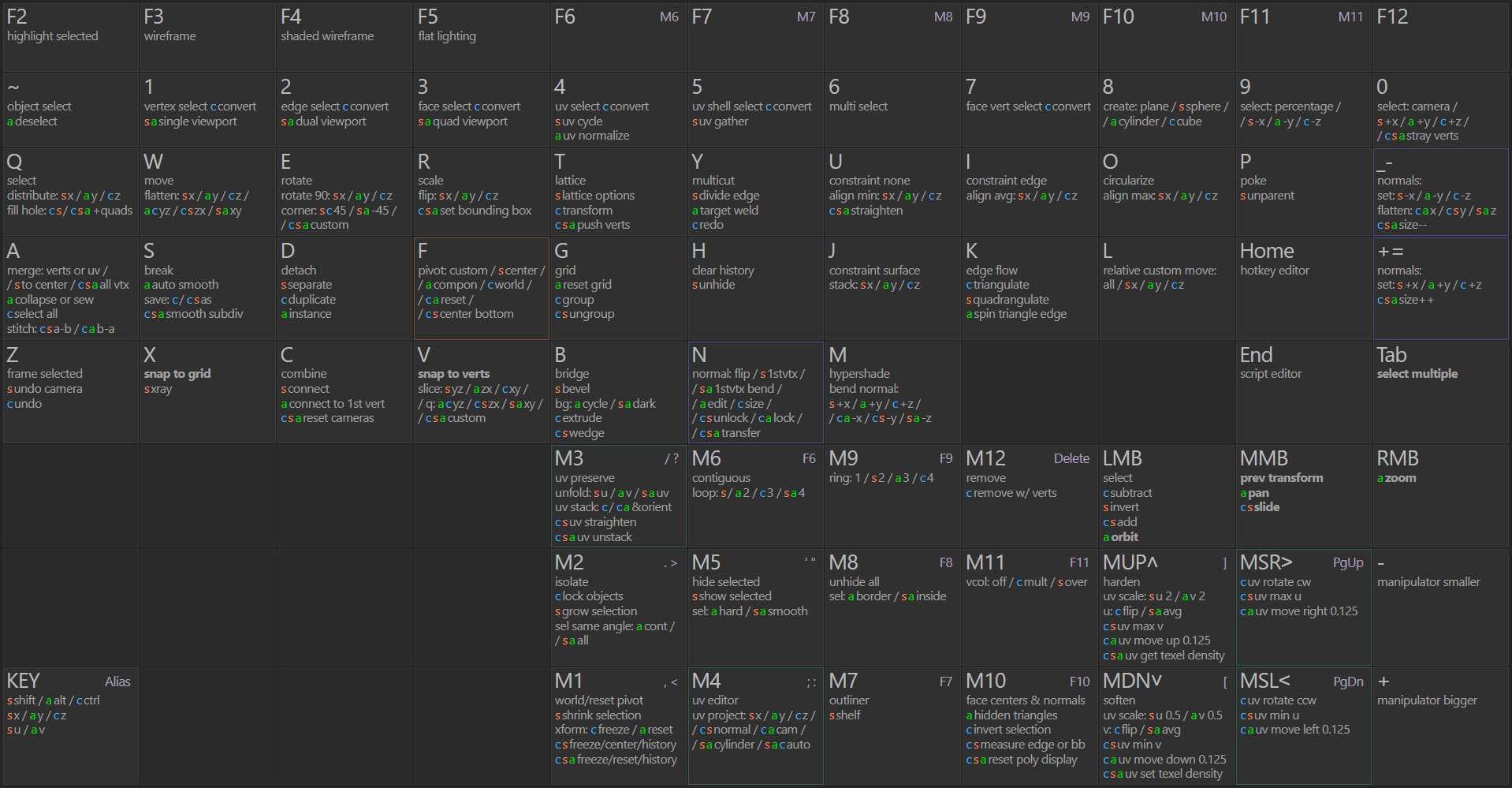
I have made and collected a ton of Maya scripts since I have to use it for work last few years, hopefully it's a gold mine for somebody like me who uses a ton of hotkeys and scripts to speed things up. https://gist.github.com/ronyx69/f661c511b7dcc018bb8fe9dbc68090bf
>>
File: shitouttaluck.jpg (248.1 KB)

248.1 KB JPG
>>1023148
>>1023176
>look in the console to see what command it's calling
I don't know where the console is in 3dsmax and if there is one. But chatgpt tells me I'm fucked.
can anyone with scripting experience confirm this?
>>
>>
>>
>>
File: workaround.webm (1023.3 KB)

1023.3 KB WEBM
>>1023210
>>1023211
>>1023486
>>1023487
The 'use pivot points' checkbox is an internal UI state of the Modify Panel and is not exposed to the standard MAXScript interface and yeah there is no direct .NET or qtMax property to toggle this specific option either. The best way to acces it would be to call a win32 command directly adressing the control but that fucking shit istoo convoluted.
Best workaround is to instance the modifiers on the rest of the objects after the fact. Yeah its stupid but don't fret too much fighting max's arcane 20 year old frankenstein UI.
Video was recorder using a screen dimmer.
>>
>>1023508
macroscript ModifiersToObject
category:"cHAIRnERD"
buttonText:"Modifiers"
toolTip: "Modifiers to Object"
(
try (
obj1 = selection
obj1prim = obj1 [1]
obj2 = pickObject rubberBand:obj1prim.pos
numods = obj2.modifiers.count
for n = numods to 1 by -1 do (
--print (obj2.modifiers[n])
addModifier obj1 obj2.modifiers[n]
)
)
catch()
)
>>
>>
>>
File: 101511172_1099698700424595_2592932667821391872_n.jpg (52.4 KB)
52.4 KB JPG
So I landed an interview for an important supermarket chain that is expanding in my country and they are widening their project/architecture department, they told me they use 3Dmax a lot and I just know the very basics. Any course or YT channel you'd recommend? I haven't touch the program in 4 years since my current job doesn't use it but this new job seems way better so I need to re-learn the program.
>>
>>
>>
>>