Thread #2974413 | Image & Video Expansion | Click to Play

File: IMG_20260203_094942.jpg (473.9 KB)

473.9 KB JPG
Hey guys it's me again, the guy that fixed the scroll mouse with acetone thanks to this board.
Anyway now I got other issue with this mouse:
1. I have some kind of lag when I move the pointer/cursor, sometimes it feels a bit dumb, like for a while is normal and then for a few seconds it feels like if the pointer speed dropped from 5/10 to 3/10, so when this happen it feels like if were one of those old mouse with the boiled egg core. My setup for my Windows pointer speed is 5/10.
2. When I move it slowly, like when you want select certain letter in a text, I can feel a loss of precision and I can notice a bit of shaking on the cursor.
3. When i lift my mouse and put it again on the surface of my deskopt the pointer doesn’t move after like for 2 seconds. When this happen all the other clicks works normal.
Any idea what could be?
Pic related a pic of the bottom part of my optical mouse. Note: I soldered those 3 wires at the top because my mouse stop recognize the left click switch(a little trick an anon teach me)
And yeah the surface of my deskopt is clean and straight without ant bumps so we already can discard that's the problem.
32 RepliesView Thread
 Showing all 32 replies.
>>
File: IMG_20260203_095023.jpg (802.8 KB)

802.8 KB JPG
And here the top part.
>>
>>
>>
File: IMG_20260123_190854.jpg (901.3 KB)
901.3 KB JPG
>>2974427
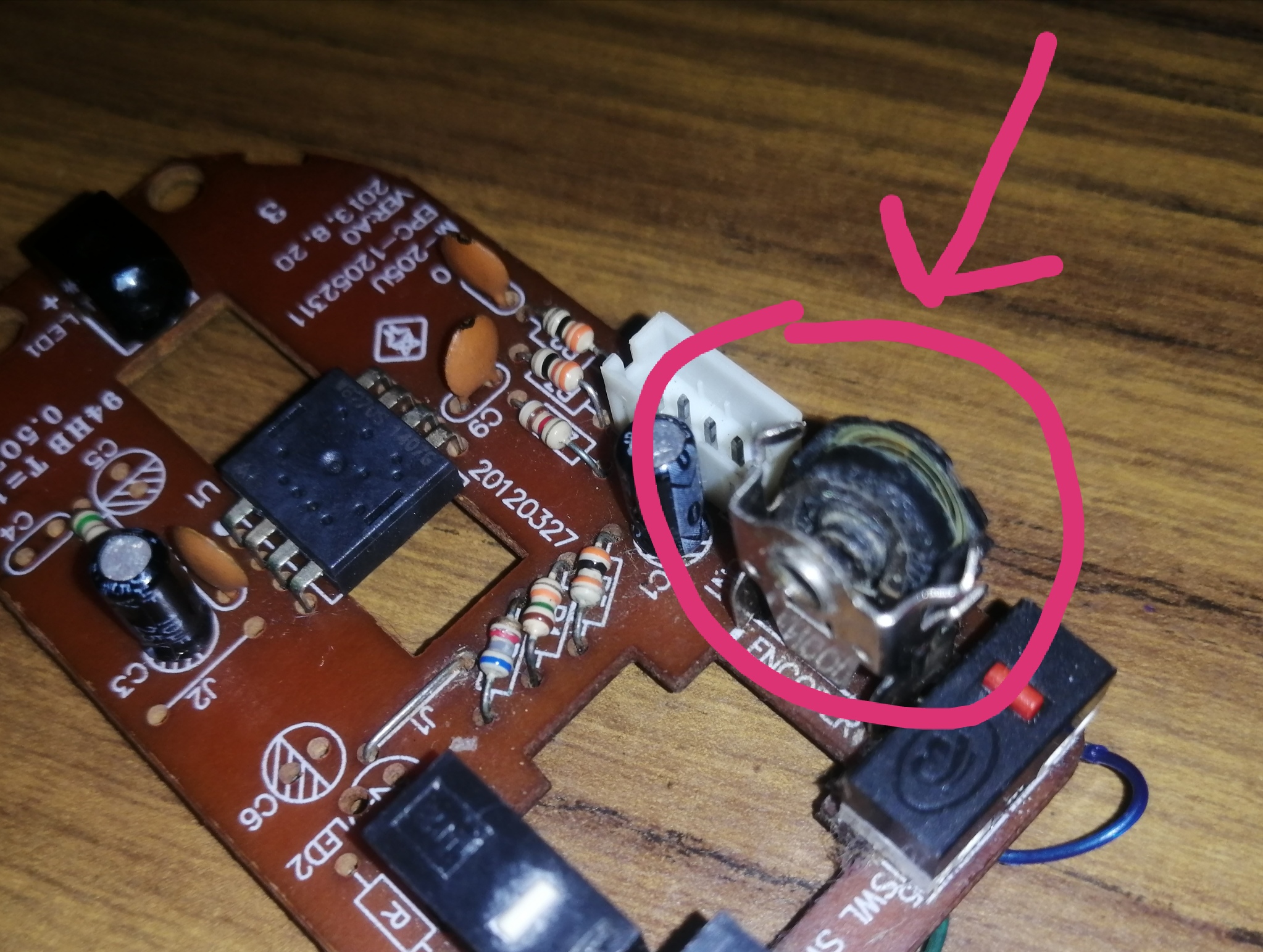
>C9 and C10 look burnt.
Pic related a picture from a few weeks ago when i was trying to fix the scroll. Those black tips were already there then and i didn't have these pointers issues back then.
But if i remove the wires my left click will not be recognized by the mouse.
I don't have compressed air to blow out the optical sensor, what could i use instead?
>>2974428
I don't think so, because when i did the acetone thing to fix the scroll i totally removed the encoder to work better.
>>
>>2974433
>Those black tips were already there then and i didn't have these pointers issues back then.
You should still replace them. In fact you should replace all the caps.
>But if i remove the wires my left click will not be recognized by the mouse.
Then go over the PCB and reflow any solder joints that look suspect. Clean the LED emitter with IPA and make sure it's straight on to the sensor.
>what could i use instead?
Do you have a balloon and a drinking straw?
>>
>>
>>
there are any shorts on those wires?
too late now but enamel coated wire is good for repair like that, takes a lot to get the insulation off not like plastic which melts and shit when you solder it
if it always does it when you click it then maybe check it under a microscope for something shorted out. look at where the white wire touches the top retaining pin of the encoder. stick some tape in there and see if that helps.
black tip on cap just means its stable over temperature or something i think
i personally would expect an electrical fault to manifest as usb not handshaking and mouse not working at all rather than just acting like theres tape over it.
if you were shitting acetone on it then yeah might have fucked the optics. do you have the little plastic bit? isn't there normally a little plastic lens that spreads the LED output around the sensor evenly?
other thing is of course don't have your desk too clean, the camera needs some texture or pattern or anything to look at to know when its been moved.
>>
>>
File: Miku smiling.jpg (126.7 KB)

126.7 KB JPG
>>2974436
>>2974435
The inner part of the prism had a few stains so I did clean the prism using Windex™ and a cotton swab and I finish it with glasses cleaning cloth. I waited a wait then I assembled everything and the pointer didn't move at all...
After that I clean it again using the glasses cleaning cloth only and this time it worked, but I still having the issue about lifting the mouse and put it again on the surface on my deskopt but in a different way:
Now I'm able to do it and the mouse will work again but sometimes the pointer will not respond after 2-3 seconds, this issue will happen 1 time for each 6 times I lift the mouse. But I can say I can say it almost feel like a normal mouse. Almost.
So the issue was the prism and not the optical sensor?
>>2974451
>there are any shorts on those wires?
Uh, I have a multimeter, can you tell me how I can check for short circuits?(a friend mine gave me this multimeter after I told him I like fix my electronics so I have no idea how to use this)
>black tip on cap just means its stable over temperature or something i think
Are you saying that the Anon who suggested me sold those 3 wires was actually trolling me in order to burn those caps?
>too late now but enamel coated wire is good for repair like that, takes a lot to get the insulation off not like plastic which melts and shit when you solder it
I used the wire of an old mouse, i just burned the tips in order to remove the plastic. This is the second time I do it. No idea why the left click of my mouse stop being recognized by my mouse. The scroll/enconder thing was already fixed with acetone.
>>2974453
If I don't fix this the Rothschild will win!
I used to buy exaclty the same model of mouse and after do it 3 times I start to learn how to fix it(aka come to this board so you guy can tell me how to fix it, 9/10 times it works, /g/ays never help, only make fun of me)
>>
>>2974475
>but sometimes the pointer will not respond after 2-3 seconds, this issue will happen 1 time for each 6 times I lift the mouse.
Try a fresh battery first. If that doesn't help then reflow all the solder joints (there aren't that many) and fix the broken trace properly by scraping away the green solder mask around the solder points of the jumpered trace, fluxing, and flowing some new solder around them.
>>
>>
File: Pepe feeding an ant eater.jpg (122.2 KB)

122.2 KB JPG
>>2974478
>reflow all the solder joints (there aren't that many) and fix the broken trace properly by scraping away the green solder mask around the solder points of the jumpered trace, fluxing, and flowing some new solder around them.
Are you sure that these 3 wires is the reason of all these issues related to the optical sensor? how about check first using the multimeter?(something that i don't know how to do it and i was hoping some of you will teach me because you guys hate the Rothschild too)
Asking because this is the second mouse I do this thing with the 3 wires, and I never had issues with the pointer/cursor on the last mouse I did this thing with the 3 wires.
>>
>>2974484
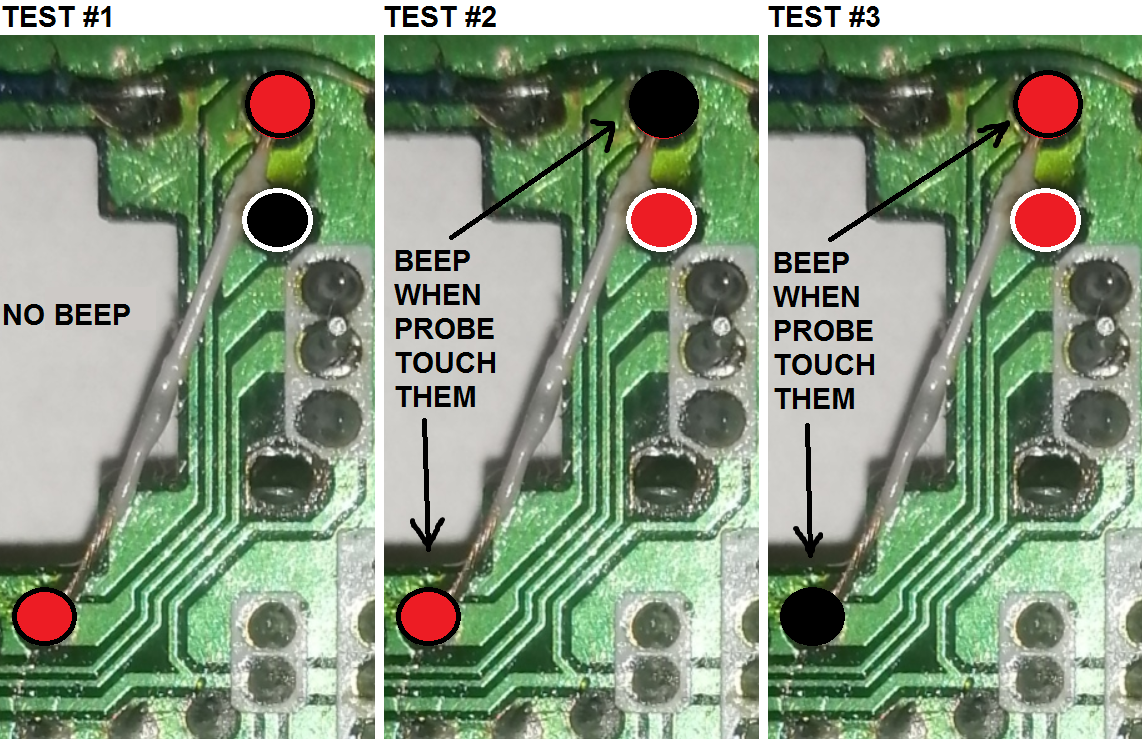
The problem is intermittent which leads me to believe that there is at least one bad connection. If you set your multimeter to diode/continuity test mode with one probe on the end f the trace and the other probe on the leg of the encoder that's right next to the wire, you should NOT hear a beep. If it beeps you have a short.
>>
>>
File: 1529453204105.jpg (278.6 KB)

278.6 KB JPG
>>2974487
>>2974489
im a retard. can you show me using my op pic exactly where put each probe?
>>

>>
File: dots.png (497.8 KB)
497.8 KB PNG
>>2974492
I did it just like you said and I didn't have any BEEEEP, but then I did other 2 test just to play with this multimeter and then I got a BEEEEP with both test(see pic related)
So are those beeps normal or nope?
>>
>>
File: 6DamY7-GrBG5IxIGo5v-EMLWnho=.mp4 (158.2 KB)

158.2 KB MP4
>>2974517
>It's not shorted so it's good.
yay
>Now you should reflow the LED pins
does it matter if I never touched before said pins? the only stuff has ever touched my soldering pencil are the click swtiches and the scroll/enconder thing.
>blow out the pickup sensor.
can i just use a drinking straw? or how about Windex™ and then clean it using a cotton swab?
> I still think you should replace the caps. Bad caps can cause all sorts of issues.
As I said, I have spare parts of this same model of mouse, and the caps of those spare parts have that black tips on C9 and C10 caps too, so I dunno, because if those caps were actually burn the mouse will not even turn on due a short circut, right?
Also:
Do I need do something special to desolder those caps? Im a turbo noob soldering electronics and in one video I recall that those little black cilinders that looks like little soda cans are dangerous and that can even explode so you have to empty any electric charge in them using a light bulb, so I ask you: do I need to perform the same procedure with these caps when I want desolder them too?
>>
>>2974526
>does it matter if I never touched before said pins?
Dropping the mouse can crack solder joints, and mechanically stressed parts break loose over time. Reflowing the solder fixes this.
>can i just use a drinking straw? or how about Windex
Do not use liquid, and don't spit through the straw. You could even fill a plastic bag with air and tape or glue a straw to the corner. Then blow it out like a bagpipe bellows. lol this is silly
>>
File: soldering is my passion.jpg (85.6 KB)

85.6 KB JPG
OP here
Well I did clean the prism and I been using the mouse for a few hours and I can notice a lot improvement so I can say the mouse was fixed.
Thank you very much to all you guys for helping me!
Fuck planned obsolescence.
Fuck jews.
>verifactiön not required
>>2974528
oki doki, thank you very much for helping me.
>>
>>
File: 0bcea3530983e2f76d3a46cc53ece3c4.jpg (33.3 KB)

33.3 KB JPG
>>2974531
anon said isopropyl alcohol.
I used acetone and it worked so welp.
>>
>>
File: shitposting.gif (191 KB)

191 KB GIF
>>2974541
Actually the mouse(mouse #1) where I originally had the scroll problem stop working after I solder again the enconder after clean it with acetone(the light of the mouse just died, i guess i burned the circuit board or something after repair it for eleven time, lol?), so I decided desolder and solder this acetone-blessed-scroll to put it on the circuit board of this other mouse(mouse #2) I had that was exactly the same model of mouse #1(i stopped using mouse #2 because this mouse stop recognzing the left side click: I tried soldering 2 different click switches that worked on other mouses but nope this mouse will not recognize them. finally i fixed it by soldering 3 wires(see op pic) on the top of the circuit board. Actually I had exactly this same issue with mouse #1, so on both I end up doing the 3-wires-trick)
Anyway who cares?
Everything works now again.
>>
>>2974475
long shot but try a different mousepad?
I had one that confused the mouse because it had a very small repeating texture to it.
Do you have parts from another of the same mouse? I would try swapping the cable first
>check for shorts
continuity mode and put one probe on one contact. it should only beep in one spot: the matching contact on the other side of the cable. If it beeps on two contacts, that's a short. no beep = break in the wire
>>
File: 1639959662113.png (248 KB)

248 KB PNG
>>2974552
Saddly I already fucked up the cable of this other old mouse because in that time i thoght it could be a broken wire from the cable or something, so I cut it and solder it again but still without working, but then some anon from this board told me about the 3-wires-tirck and ta-da it the left click it worked again(to perform this trick I needed a thin wire so I used the already fucked up cable of this mouse)
Anyway I already fixed it the pointer issue: The issue was a dirty prism.
>>
>>2974558
okay good news! on a side note, you know those youtube channels where they shoot a ballistics gel head? well, what if there was a whole channel dedicated to beheading them with a knife and other tools? I think it's psychopilled enough to work
>>
>>
>>
File: _887fbcb1-e518-4314-a858-48020701a2c5.jpg (260.5 KB)

260.5 KB JPG
>>2974641
Yes but I still having a little, just little issues when I lift the mouse: now just happen like 2/5 times so i guess i should give a little cleaning to the optic sensor
>>2974566
Anon did you were sniffing Blow Off - Electronics Duster again?
>>2974639
But acetone smell ms good, just like gasoline.