Thread #4495066 | Image & Video Expansion | Click to Play

File: IMG_0025.jpg (3.6 MB)

3.6 MB JPG
Snagged an old sony broadcast camera.
Having some overheating problems, replaced the DC fan inside, helped cool it a little, but overall still reaching about 30-32c.
Noticed it when hot pixels started showing up a few minutes into shooting.
I assume its a problem with the CCD overheating or something, but is there any less intrusive way to cool the camera down better?
27 RepliesView Thread
 Showing all 27 replies.
>>
>>
>>
>>
File: IMG_0026.jpg (2.4 MB)

2.4 MB JPG
>>4495070
Got it recently, lots of snow and don’t have proper gear to go out and shoot
>>4495082
Picrel
>>4495086
Where would I need to install that?
>>
>>4495098
Probably too cramped for one, but it is the optimal solution for sensor cooling. High end sensors use them.
You would use thermal paste to adhere it to the backside of the sensor then use a heatsink or heat pipe + fan to keep the hotside cool.
>>
>>
>>
>>
>>4495119
ikr why the fuck was the first thought to jam a fan inside a sensitive antique electronic? Like really? Maybe you could slap some thin heatsink inside for passive cooling but it's still going to be INSIDE the fuckin thing.
OP if you can manage to output the footage to a file we can probably tell you what the fuck is going on. Hot pixels are pretty obvious, but interference, shitty solders, failing transistors, PCB melting etc. etc. can all contribute to a funny looking image.
>>
>>4495112
I’ll try that out
>>4495121
Old dc fan wasn’t working anyways so I replaced it since that was one of the listed problems with it lol. Not an expert by any means so I wouldn’t doubt it was more than the temp of course, just going off what I understand was the initial problem
>>4495118
Can’t record on the camera itself gotta get proper converter and record that way, don’t have that yet, been testing via monitor. Can run a test that way probably.
Only other thought is it’s WDR? Hot pixels show up more in darker areas
>>
>>4495118
>what gear do you need
Takes either OFC (which I don’t have)
And VGA which is a cheaper more accessible option
>you don’t seem really interested in checking
What are you my math teacher? Could do without the smarmy fag remarks lol
>>
Took some very rudimentary snapshots with a phone to show what I mean since I can't screen record at the moment.
Didn't capture, but turning it on for the first few minutes, picture is clear, no visible dead pixels or issues.
after about 4-5 minutes
https://files.catbox.moe/dlujac.JPG
some settings
https://files.catbox.moe/a1i8eo.JPG
dropped gain incase lots of light was making it act up
After about 10-15 minutes
https://files.catbox.moe/6aabp6.JPG
static white pixels are very prominent, and faint multi colored pixels start to show as time goes on, at this point I shut it down
>>4495082
>>4495119
>30deg
I misspoke in how I described it, this was the temperature that the body/inside was at. While capturing these pics, inside reached about 33deg. I'm assuming CCD could be alot higher.
>>
>>4495169
>>4495112
That doesn't look like interference, otherwise the pixels would be jumping around like static.
It looks more like it has a couple faulty pixels and they get brighter as the camera tries to do autoexposure. If you don't have a lens that mounts on it, you can literally just tape an SLR lens to it, it'll be out of focus, but you'll at least get a reasonable amount of light focused onto the sensor.
>>
>>4495169
you might need to repaste some components then, is it possible for you to remove the sensor and check how it's physically connected to the metal backplate ? You have 2 failure modes that you should investigate basically:
>1 the thermal exchange between sensor and backplate isn't working
>2 the exchange is working but the backplate is too hot
then you should check all probable causes of both :
>1 -> thermal paste is dead ? screws aren't tight enough? ...
>2 -> not enough airflow behind the backplate ? not enough surface area? Other electronic is heating the backplate ? Is the sensor itself malfunctioning ? ...
it's a guessing game you have to find the root cause instead of listening to random advice about strapping coolers at random places. You can also just tell your camera to ignore hot pixels
>>
>>4495177
using the canon bctv zoom lens it came with, should my goal be to find a way to prevent auto exposure/high exposure? If there ends up being a couple consistent dead pixels I'm cool with editing those out in after effects, but I wanna be sure I can prevent more from popping up and staying
>>
>>4495178
I can imagine the thermal paste can be an issue due to age alone.
(the camera has like 92k hrs clocked LOL)
I'm open to opening it up more and checking it out but I've never dealt with anything involving camera sensors and the angling/placement of sensitive parts like that.
Besides the maintenance manual for the x300-x310 there's almost no visual guides or view of the parts.
>>
>>
>>
>>
>>
>>4495189
lol
>>4495195
I don’t believe that not gunna lie
Realistically I’ll reach out to someone who’s worked on CRT tvs or something. Had a guy who reliably fixed an old JVC monitor of mine a while back, would probably make more sense to ask if he could do it rather than me try and tinker too much and end up dying from something stupid
>>
>>
>>
>>4495211
>just try every button
fair fair
>ac input
just has a 4 pin DC IN power port, guessing that would be safer than like an ac120v CRT tv lol maybe I'll just use some rubber gloves and attempt further disassembling
>>
Took out the chunk of the camera that houses the sensor, noticed that the cardwire that I'm assuming connects to the sensor is connected at an angle, could that contribute to the problem?
https://files.catbox.moe/q2zf0p.jpg
>>
File: IMG_0038.jpg (477.4 KB)
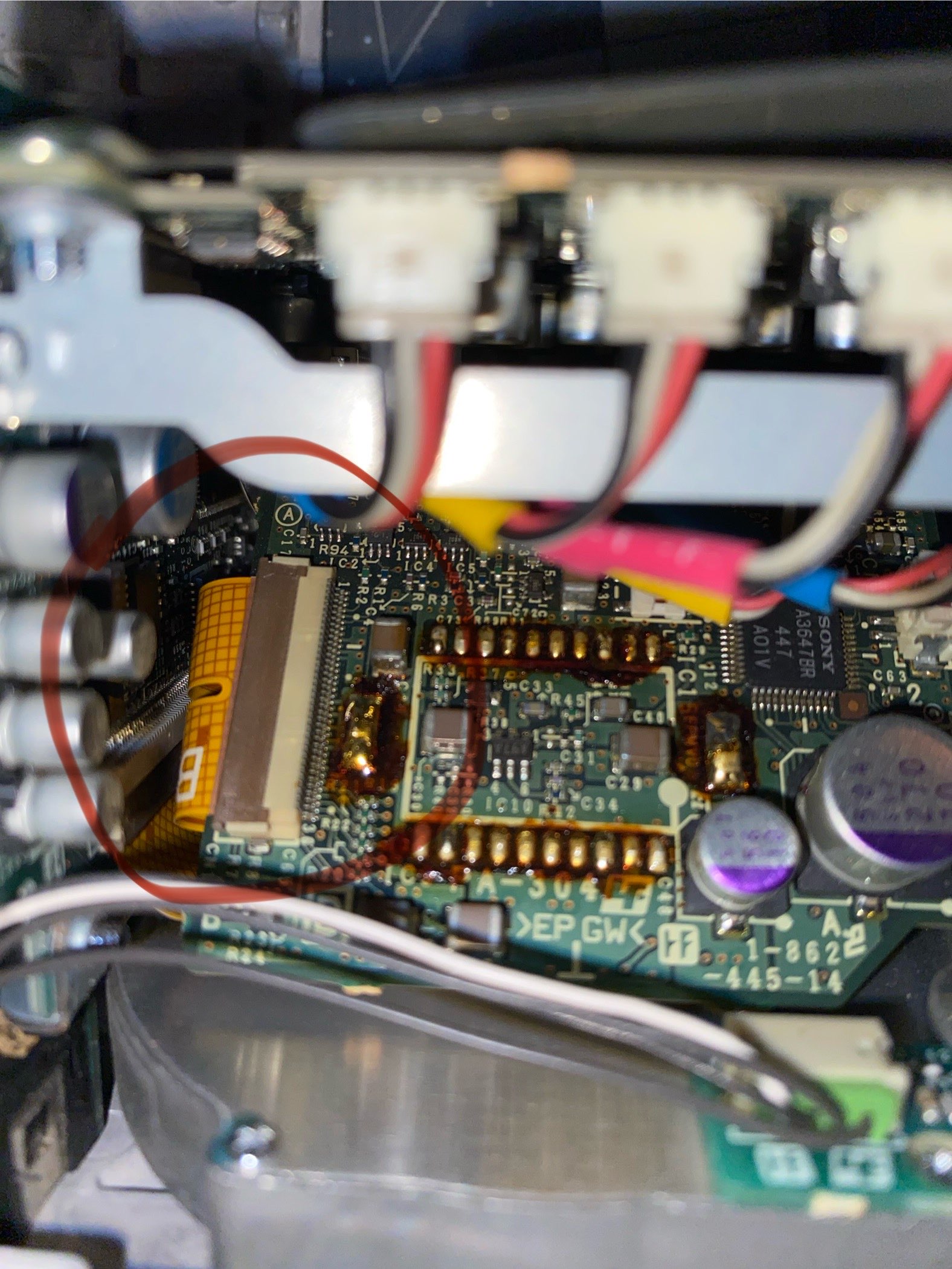
477.4 KB JPG
posting image cuz I forgot to add multiple img links lol so here