Thread #1391917 | Image & Video Expansion | Click to Play

File: Hako Ni Go Itai.jpg (20.3 KB)

20.3 KB JPG
Feel free to post old japanese eroge and visual novels, forgotten and lost in time.
Collections of old/lost games are also well accepted.
Previous Thread here >>1240033
13 RepliesView Thread
 Showing all 13 replies.
>>
1TB collection from the previous thread
magnet:?xt=urn:btih:8F3CD925A7C4BECEE3326004130CBF8F71F0900F&dn=Visual %20Novels%20and%20Similar&tr=udp%3a %2f%2fexplodie.org%3a6969%2fannounc e&tr=http%3a%2f%2fmgtracker.org%3a2 710%2fannounce&tr=http%3a%2f%2ftrac ker.tfile.me%2fannounce&tr=http%3a% 2f%2fglotorrents.pw%3a80%2fannounce &tr=udp%3a%2f%2ftracker.coppersurfe r.tk%3a6969%2fannounce&tr=udp%3a%2f %2ftracker.glotorrents.com%3a6969%2 fannounce&tr=udp%3a%2f%2ftracker.le echers-paradise.org%3a6969%2fannoun ce&tr=udp%3a%2f%2ftracker.opentrack r.org%3a1337%2fannounce&tr=udp%3a%2 f%2fexodus.desync.com%3a6969&tr=udp %3a%2f%2ftracker.opentrackr.org%3a1 337%2fannounce&tr=udp%3a%2f%2ftrack er.leechers-paradise.org%3a6969%2fa nnounce&tr=udp%3a%2f%2ftracker.copp ersurfer.tk%3a6969%2fannounce&tr=ud p%3a%2f%2fp4p.arenabg.ch%3a1337%2fa nnounce&tr=udp%3a%2f%2feddie4.nl%3a 6969%2fannounce&tr=udp%3a%2f%2ftrac ker.zer0day.to%3a1337%2fannounce&tr =udp%3a%2f%2fp4p.arenabg.com%3a1337 %2fannounce&tr=udp%3a%2f%2ftracker. internetwarriors.net%3a1337%2fannou nce&tr=udp%3a%2f%2f9.rarbg.me%3a274 0%2fannounce&tr=udp%3a%2f%2f9.rarbg .to%3a2740%2fannounce&tr=http%3a%2f %2fnyaa.tracker.wf%3a7777%2fannounc e&tr=http%3a%2f%2fsukebei.tracker.w f%3a8888%2fannounce&tr=http%3a%2f%2 fanidex.moe%3a6969%2fannounce
>>
File: Vamps and whatnot.jpg (53.4 KB)

53.4 KB JPG
Hey Chunnibros, does anyone have the magnet to Vampirdzhija Vjedogonia by any chance? I would greatly appricate it thank you.
>>
>>
>>1391935
What's the best one, anon? I enjoyed Bible Black very much. But wasn't able to hit the same high with the other old and new eroges. Either it doesn't run well on modern pc, art wasn't to my taste, or too straightforward, minimal branching.
>>
>>
File: SCREENSHOT.png (5.2 KB)

5.2 KB PNG
>>1392700
Danke schön. Although, I'm not exactly sure how any of this works, what should I do with the BIN and the other file to play the game? (Sorry, It's kinda my first time with this sort of stuff
>>
>>
File: error.png (21.9 KB)
21.9 KB PNG
>>1392704
Alright, so I did basicly everything according to what was told on the .moe website (Windows>Pirated). I changed the locale to Japanse and set up the internal calendar to the Japanse one as well.
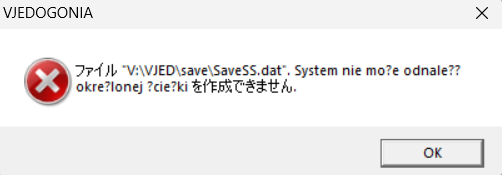
The problem comes from the fact that theres no sound or music. Japanse words in the textbox appear jumbled and messages like this one appear every time I select or click any option in the VN. No idea whats up with that.
Once again thanks for providing info, tho.
>>
>>1392706
Did you install the game after mounting it, or did you just ran the game from there? Sound and music missing, together with the savefile from your pic, makes me think you haven't actually installed the game...
What's your Windows version? Modern windows tend to fuck up with older visual novels...
Also, usually the drive for CD/DVD is D: , so why is it V: on your PC? If it's installed, it should be on the C: disk.
The locale might also be completely fucked. What's the your Windows system locale?
>>
>>1392708
Windows 11.
Currently I am downloading the IME Editor (mounted for D: and also DVD-ROM, changed nothing else) for the Japanse text from the settings, also my bad for choosing V (the tutorial said that any setting was good, guess not)
Running the BIN file with WinCDE opens it in the driver tab in the menu, there I find a .exe file called "Menu" and next to it a bunch of folders, they contain stuff like in-game movies, music, and also another VJED.exe file with what seems to be the game. I turn it on and it seems to work, but by that I mean that it plays no audio or music (with every time i click any option a error message pops up about how it cant find a file or something like that, otherwise the in-game Vn text is also the typical jumbled japanse-english fare.
Im still waiting for the IME text to download so ill see what happens then.
>>
>>1392712
>Running the BIN file with WinCDE opens it in the driver tab in the menu, there I find a .exe file called "Menu" and next to it a bunch of folders, they contain stuff like in-game movies, music, and also another VJED.exe file with what seems to be the game. I turn it on and it seems to work, but by that I mean that it plays no audio or music
Have you tried copying all the game files from the folder onto your PC and starting it from there?
>otherwise the in-game Vn text is also the typical jumbled japanse-english fare.
Try again after doing what I told you.
If you still have troubles with the locale, check the visual novel thread /vn/ on /vg/ for help, or maybe the エロゲスレ thread on /jp/.
One more suggestion from there:
> In Windows 11/10/8/7/Vista, it is recommended to install games outside of the default Program Files (x86) folder, due to legacy issues with how 7 handles the Programs Files folders and how older games modify files within those folders.
>>
>>1392713
Okay, update. I have succesfully managed to install the game after using Menu.exe to just dowload everything into a nice folder, everything seems to work well if i just access it from the install menu exe. Sound works, so does music, the only problem left is the jumbled text. I downloaded the IME Japanse text pack, so theres that. 石の上にも三年 ! ! !
I guess Ill tinker some more, thanks for the help.
>>
>>1392716
>the only problem left is the jumbled text.
That's the usual japanese locale problem, just try out the usual stuff: changing locale software, trying other version of japanese encoding (like shift-jis) and so on.
Just, be sure that all the files have correct filenames; even 1 file with garbled text can fuck everything up!
Still, most of the work is done, Now it's only a matter of finding the correct locale!