Thread #1556019 | Image & Video Expansion | Click to Play

File: emmc message.png (60 KB)

60 KB PNG
my hikvision camera has this message under system settings - system service
> When the lifespan of eMMC is below 5% or under high-frequency writes, write protection will be triggered with OSD overlay. In the write protection mode, data storage for some functions will be unavailable, and settings will be cleared after a restart
this is after upgrading to firmware v5.8.12
before, i was running fw 5.8.0, and a more ominous message was on:
> 95% eMMC life has been used and eMMC cannot save videos and snapshots. You can disable the eMMC protection to continue saving videos and snapshots.
i can still save settings after a restart, and obviously i was able to firmware upgrade today. there are no osd messages displayed. i've had this camera for 6 months running without storage.
anyone else has this or can confirm it to be benign?
4 RepliesView Thread
 Showing all 4 replies.
>>
>>1556019
Says your used capacity is 0%
So if you got this message displayed it probably is just purely timer based and can be ignored if everything works and if not it is just an explanation what this option means - that activating it will make use more safe but can lead to you not being able to write to it anymore.
>>
File: Screenshot 2026-01-29 at 13-23-24 Configuration.png (31.4 KB)

31.4 KB PNG
>>1556020
"eMMC Protection" setting is enabled by default, and even when enabled, the camera still saves settings, can upgrade firmware, and retain changes after a restart.
Before upgrading the firmware, it sounded even more ominous:
> 95% eMMC life has been used and eMMC cannot save videos and snapshots. You can disable the eMMC protection to continue saving videos and snapshots.
that was on fw: 5.8.0
>>
>>1556019
Seems like something completely esoteric. To err on the side of caution, storage manufacturers have ways to warn you that your disk is too old. You should usually be fine. I would disable it if you are certain that you don't need it.
>>
File: ss.png (44.4 KB)
44.4 KB PNG
>>1556140
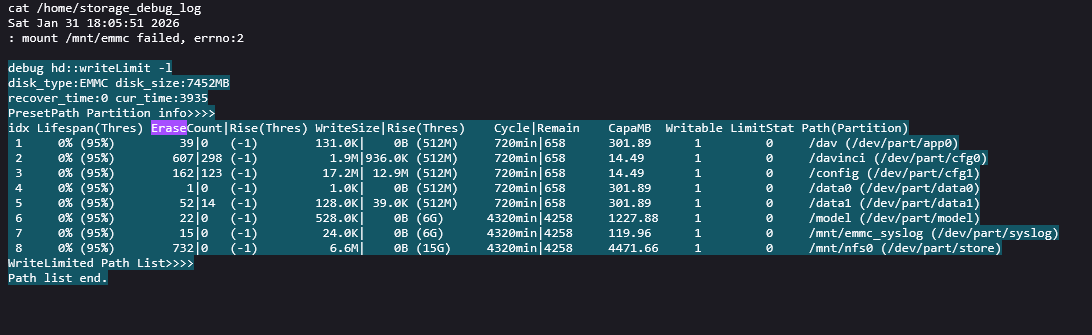
anon i have been going at this problem for days, and don't know what to do. i simply cannot determine how much wear there is (the 95% number is not actual) i looked in the log files for storage info, and found this table describing erase | write counts with their respective thresholds, but the problem is these numbers do reset every 2 or 3 days, and aren't cumulative.
debug hd::writeLimit -l
disk_type:EMMC disk_size:7452MB
recover_time:0 cur_time:3935
PresetPath Partition info>>>>
idx Lifespan(Thres) EraseCount|Rise(Thres) WriteSize|Rise(Thres) Cycle|Remain CapaMB Writable LimitStat Path(Partition)
1 0% (95%) 39|0 (-1) 131.0K| 0B (512M) 720min|658 301.89 1 0 /dav (/dev/part/app0)
2 0% (95%) 607|298 (-1) 1.9M|936.0K (512M) 720min|658 14.49 1 0 /davinci (/dev/part/cfg0)
3 0% (95%) 162|123 (-1) 17.2M| 12.9M (512M) 720min|658 14.49 1 0 /config (/dev/part/cfg1)
4 0% (95%) 1|0 (-1) 1.0K| 0B (512M) 720min|658 301.89 1 0 /data0 (/dev/part/data0)
5 0% (95%) 52|14 (-1) 128.0K| 39.0K (512M) 720min|658 301.89 1 0 /data1 (/dev/part/data1)
6 0% (95%) 22|0 (-1) 528.0K| 0B (6G) 4320min|4258 1227.88 1 0 /model (/dev/part/model)
7 0% (95%) 15|0 (-1) 24.0K| 0B (6G) 4320min|4258 119.96 1 0 /mnt/emmc_syslog (/dev/part/syslog)
8 0% (95%) 732|0 (-1) 6.6M| 0B (15G) 4320min|4258 4471.66 1 0 /mnt/nfs0 (/dev/part/store)
WriteLimited Path List>>>>
Path list end.
The camera works OK, settings save, can fw upgrade or factory reset. and there's no write protection.
What caused this is the lack of SD card, and the continuous logging of alarm, event, ptz movement and thumbs for 6 months