Thread #108063341 | Image & Video Expansion | Click to Play

File: 9781593279530.jpg (446.6 KB)

446.6 KB JPG
Users of all levels are welcome to ask questions about GNU/Linux and share experiences.
*** Please be civil, notice the "Friendly" in every Friendly GNU/Linux Thread ***
Before asking for help, please check our list of resources.
If you would like to try out GNU/Linux you can do one of the following:
0) Install a GNU/Linux distribution of your choice in a Virtual Machine.
1) Install a GNU/Linux distribution of your choice on bare metal and run your previous OS in a Virtual Machine.
2) Use a live image and to boot directly into the GNU/Linux distribution without installing anything.
3) Go balls deep and replace everything with GNU/Linux.
Resources: Please spend at least a minute to check a web search engine with your question.
Many free software projects have active mailing lists.
$ man %command%
$ info %command%
$ %command% -h/--help
$ help %builtin/keyword%
Don't know what to look for?
$ apropos %something%
Try a random distro:
https://distrosea.com
https://distro.moe
Check the Wikis (most troubleshoots work for all distros):
https://wiki.archlinux.org
https://wiki.gentoo.org
https://wiki.debian.org
/g/'s Wiki on GNU/Linux:
https://igwiki.lyci.de/wiki/Category:GNU/Linux
>What distro should I choose?
https://igwiki.lyci.de/wiki/Babbies_First_Linux
>What are some cool programs?
https://wiki.archlinux.org/index.php/list_of_applications
https://directory.fsf.org/wiki/Main_Page
https://suckless.org/rocks/
>What are some cool terminal commands?
https://www.commandlinefu.com/commands/browse
https://cheat.sh/
>Where can I learn the command line?
https://mywiki.wooledge.org/BashGuide
https://www.grymoire.com/Unix/
https://overthewire.org/wargames/bandit
https://tldp.org/LDP/Bash-Beginners-Guide/html/Bash-Beginners-Guide.ht ml
>Where can I learn more about Free Software?
https://www.gnu.org/philosophy/philosophy.html
>How to break out of the botnet?
https://prism-break.org/en/categories/gnu-linux
GNU/Linux Games:
>>>/vg/lgg
Previous thread: >>108049051
152 RepliesView Thread
 Showing all 152 replies.
>>
File: Screenshot_20260202-153228.Termux.png (276.3 KB)

276.3 KB PNG
if you don't have proper autocomplete in your shell, you're missing out
>>
>>
>>
>>
>>
>>
>>
>>108063515
Writing a line or two into journalctl isn't an effective reminder. I'm not going to look there.
I'm thinking KDE has to be involved because how else are you going to reliably get a notification? You could put it in the shell greeting but there's no guarantee you open a new shell on a particular day
>>
>>
>>
>>108063547
https://wiki.archlinux.org/title/Desktop_notifications
>>
>>
File: 83cddafc0204acc2e20d898d1a0ec247.jpg (121 KB)

121 KB JPG
>>108063564
are you inviting me for dinner?
>>
File: 1770220888588342.jpg (75.8 KB)

75.8 KB JPG
>>108063435
good, terminals are only for the White man
>>
Some of the animations on my KDE Plasma seem sluggish. And I think some programs also are. It feels like I have a tiny latency when writing in Doom Emacs and the scrolling in Sublime Text seems sluggish. And native Dota 2 just seems like it struggles to load. I've even gotten some abandons because the game won't load the game map on time when match is ready. I have no idea how to troubleshoot this as I think it has something to do with GTK or whatever those things are and however they're called. So, does anyone know how to check what the problem is and how to fix it?
Using Arch with a RTX 4070, drivers and all that jazz has been set up properly as I was using Hyprland for months before this, and everything was smooth.
>>
>>108063584
>https://wiki.archlinux.org/title/Desktop_notifications
I tried notify-send and it popped up a message for 5 seconds which then disappeared with no trace anywhere. Kind of a weak reminder. I guess I'll conclude that this isn't possible to do in a reasonable way
>>
File: system76-cosmic-alpha2-desktop-environment.jpg (366.3 KB)

366.3 KB JPG
How can they release an operating system that doesn't even have an image viewer and doesn't let you open apps like gufw?
>>
>>
>>
>>108063634
>I think it has something to do with GTK
GTK is a GUI framework for widows and sheit, as far as i understand it shouldnt matter
i wonder of you are having some weird storage issues
>>108063643
brother
before using CLI tools or making conclusions about them maybe pass the --help flag or read the man page
if you've done that then maybe you wouldve noticed that you can change the time out or make it so that you need to close it yourself
>>108063646
images are bloat
i extract RGB data and read it
>>
>>
>>108063692
tbf it's not clear from --help that you need to set urgency to critical for it to stay, but fair. A reminder isn't critical but whatever. I thought --wait might do that but it just blocks the process until the message leaves on its own.
So I guess the approach would be
>make a systemd timer at the user level
>it turns rem -h and checks if the output is empty (I don't want "No reminders." popups every day lol)
>if not empty run notify-send
I was kind of hoping for something less jank but oh well
>>
>>108063731
sometimes the best shit is jank
ive seen an entire distribution glued together by shell scripts
and oh boy is that shit hackable
fixed missing two features in like 15 min each by just looking through the scripts and checking what calls what
dont even need documentation lmao
>>
>>108063731
>tbf it's not clear from --help that you need to set urgency to critical for it to stay, but fair.
It's deliberately ambiguous because notify-send can't know that. Its implementation specific whether or not your desktop decides to wait/timeout or not. Different notification daemons may simply always stack notifications and never time them out.
>>
>>108063772
Yeah, I guess it's an interop/standardization problem.
I was surprised to learn that notifications vanish completely if missed though. Like the KDE notifications tray icon just says "no unread notifications", with no apparent way to show the read notifications. For all I know something could tell me "your ssd is failing", if I'm away from the pc for 5 seconds there would be no trace of it. I guess that's why urgency=critical exists, but it would make more sense to leave an unobtrusive tray icon until you dismiss it.
Weirdly the ancient graybeard method would probably be cleaner
>put rem -h in crontab
>if it has non-empty output it automatically gets mailed to you
>next time you open a terminal you get told you have mail
>>
File: Screenshot_20260205_024633.png (396.2 KB)

396.2 KB PNG
>>108063866
It _does_ keep them in the history but low-priority notifications (which is all of them apart from critical notifications because "normal" priority doesn't mean "normal" priority it means "I'm a retarded dev who forgot to assign an urgency hint to this therefore it doesn't matter").
You can change it in the settings though to always keep history for everything.
>>
I've been using the love2d framework and it did work fine on my arch linux rig, but suddenly I'm experiencing the following error:
>Unable to create OpenGL window
>This program requires a graphics card and video drivers which support OpenGL 2.1 or OpenGL ES 2.
>SDL window creation error: Couldn't find matching GLX visual
this issue might have occured after upgrading my nvidia drivers. Issue is, when I try to downgrade, it forces my screen at a very low resolution, and 60hz, even though my screen has 100.
Has anybody experienced this issue aswell?
>>
Hello /fglt/ I am very ignorant about Linux and I have a question that would probably fit better in the Stupid Questions thread so please bear with me a little:
I installed Linux Mint 22.3 earlier this week, and I also installed Steam (using the Software Manager)
Now, whenever I start downloading a game, Steam asks me if I want to save it to (/) which is apparently the name of my drive. Is that normal? I thought / was like, the name of the folder where all the OS files and shit are.
The actual, full location where the games are saved in is /home/user/.steam/debian-installation/steamapps/common so I assume it's not actually saving them in the same folder as OS components, I was just a bit weirded out by the drive name I guess.
>>
>>
>>108064206
Steam calling the drive / is a slight Windowsism, but technically it's correct because the root directory of your operating system is /, and all other partitions are mounted somewhere under / (typically as folders under /mnt or /media). Steam games by default are indeed installed under your Steam Library folder in ~/.steam, so you don't have to worry about permissions or competing with OS components. Anyway you're probably going to uninstall Mint a week from now, so you may as well start looking into Plasma distros today.
>>
>>108064324
>Steam calling the drive / is a slight Windowsism, but technically it's correct because the root directory of your operating system is /, and all other partitions are mounted somewhere under /
I see. Yeah, that makes sense, thanks m8
>Anyway you're probably going to uninstall Mint a week from now, so you may as well start looking into Plasma distros today.
I -am- curious about KDE because it looks very sleek and apparently it's very customizable, that's very appealing to me.
What's wrong with Mint though? So far it's been pretty retard friendly which is a big plus for me.
>>
>>
>>
>>108064357
>Mint users keep getting GNOMEd
Mint keeps installing GNOME on people's computers because at some point Mint started automatically installing packages' optional dependencies. Did they audit the entire Ubuntu repo to check if whole desktop environments were marked as optional dependencies of certain packages? No.
>Doesn't work with modern monitors
Forget about HDR and VRR, and if you have multiple monitors where the refresh rates are not divisible by each other, it's gonna be fucked
>The file explorer is horrid
You can't right-click hard drives, and typing inside of a folder pulls up a text field instead of just highlighting the file that corresponds to your keypresses
>The UX is still fragmented
You still can't install updates (aka manage software) using the so-called Software Manager, which merely installs software; you have to go through a separate updating app
>Pressing update in the updater app still does not bring your computer up-to-date
Once the next version of Mint comes out, you still need to manually change your sources to the next point release. There's countless people who simply don't know to do this and have been stuck on ancient versions of Mint for years
>You still need to manually change your apt mirrors
Mint by default does not choose the fastest mirrors based on your connection (something every normal distro has done for years), so unless you know to do this, you'll be downloading Mint's Frankenstein repo from mixed UK and US mirrors
>No RAM compression
Linux and Windows have had this for years but Mint doesn't for some reason
>Can't just double-click AppImages
AppImages are basically just Linux's equivalent to portable apps on Windows. but on Mint it's not enough to just double click them in your file explorer to run them; you have to manually set up EACH .AppImage to have executable permissions.
>Older kernels
It is always in the interest of a gamer to use the latest kernel.
>>
>>108064416
>I'm trying to learn more about operating system functions on a very low level.
https://wiki.osdev.org/Expanded_Main_Page
>Do you guys have any recs for info about low level linux stuff, like how the kernel actually works, memory handling, etc?
https://docs.kernel.org/
>>
>>108064488
>Did they audit the entire Ubuntu repo to check if whole desktop environments were marked as optional dependencies of certain packages? No.
To be fair to Mint they shouldn't have to. This is clearly a bug on the Ubuntu maintainers side. If I were on Kubuntu would I expect the entire GNOME desktop environment to be pulled in because I installed some random app? No, no I wouldn't. Applications generally should not depend on entire desktop environments to function.
If you install a KDE app for example it will pull in a lot of KDE Frameworks but never the entire Plasma desktop.
>>
>>108064527
>This is clearly a bug on the Ubuntu maintainers side
It's not a bug on Ubuntu or Debian, because Ubuntu and Debian only install optional dependencies with the user's consent; Mint just forces their installation.
>>
>>
>>
File: debian-linux.png (24.7 KB)

24.7 KB PNG
>>108064357
Listen to >>108064488
Mint is a meme.
Install Debian instead if you want a nice stable linux distro that people actually respect.
Its also pretty retard friendly, you can just pick KDE in the installer if that is the environment you want.
Updating and managing packages is super easy, it even comes with a little App Store that you can download programs from if you dont want to use the scary terminal.
Though, you should learn how to use the terminal, its pretty easy and makes doing stuff WAY faster than the GUI once you learn it.
>>
>>
>>108064548
It's a problem because you could end up installing three completely different desktop environments that way.
Ideally Apt should have conditional dependencies that can express "If I have the GNOME desktop environment installed then recommend the GNOME integration" but APT is a pile of shit so it can't do that.
>>
>>108064562
>you could end up installing three completely different desktop environments that way
That would only, and I mean ONLY happen on Ubuntu or Debian if you explicitly typeapt install --install-suggests package-name. Mint however forces the installation of suggests.
>>
>>108064550
debian is great and i have it on basically every machine i own, but it's definitely less noob friendly than mint
it doesn't have a firewall set up out of the box (tho it's easy to do with ufw), it doesn't have zram/zswap set up out of the box (more complex to setup, not hard but not noob friendly), enabling backports requires editing conf files, etc
>>
>>108064574
It's still an Apt issue though because you should be able to do this and satisfy the dependency without having the entire desktop installed. Fedora's Dnf for example doesn't have this problem. They have a way to express weak dependencies.
>>
>>108064488
Most of these (the ones I understand anyway) are a non-issue for me because I only have a single monitor, an old CPU and GPU and no interest in modern games.
This one
>No RAM compression
Sounds important but I don't know what it is.
What is RAM compression and how does it affect me?
Like I said, I am interested in KDE and I considered Fedora before installing Mint. It's not out of the question for me to try that one out too.
>>108064550
Won't Debian also have older versions of the Linux kernel and software in general?
How is it for gaming?
Everything I've tried playing on Mint so far works very well.
>>
>>108064550
>Though, you should learn how to use the terminal
You really don't have to in 2026 Linux, not even on Debian. At this point does Debian (the KDE edition anyway) even qualify as a DIY distro anymore?
>>108064577
>What is RAM compression and how does it affect me?
It uses a compression algorithm on your RAM so that you use less RAM. Since you have a modest setup this is pretty much indispensable for you.
>>
>>108064577
>Won't Debian also have older versions of the Linux kernel and software in general?
Not really. Debian 13 just came out a few months ago. I've been using it since launch, used Debian 12 before too, and its been very nice.
>How is it for gaming?
Gaming has been fine. Debian is a point-release distro meaning that it gets updates/releases at certain POINTS.
This is compared to something like Arch which has a rolling release meaning it gets new updates ASAP
However, the thing about Debian though is that even though it has a point release schedule, it actually makes an exception for GPU drivers.
It doesn't get them as fast as Arch, but GPU drivers usually come after a few weeks to make sure they're stable.
>>
>>108064596
>Debian (the KDE edition anyway
i'm >>108064575
i wouldn't use kde on debian, seems like there are lots of issues with it. of course your mileage may vary. just my 2cents.
>>
File: 1770268331316.jpg (1.9 MB)

1.9 MB JPG
>>108064522
I greatly appreciate it, thank you.
>>
>>108064577
>Won't Debian also have older versions of the Linux kernel and software in general?
Debian 13's software is massively newer than the Ubuntu 24.04 LTS base Mint uses. And while there is a Linux Mint Debian Edition, it's only available in one desktop environment (Cinnamon) and is pretty much identical to Debian 13 Cinnamon aside from the default wallpaper. There's no reason to use LMDE (or Debian Cinnamon) over Debian KDE.
>>
>>
>>108064643
>>108064619
Well then, sounds like Debian is at least worth checking out. Thanks for the input
>>108064596
>It uses a compression algorithm on your RAM so that you use less RAM. Since you have a modest setup this is pretty much indispensable for you.
OK yeah that's a pretty big deal...
>>
>>
>>
>>108064827
Check your CPU governor:
https://wiki.archlinux.org/title/CPU_frequency_scaling
>>
>>
>>
File: 1522324399366.gif (263 KB)

263 KB GIF
How's the situation with program compatibility on asahi linux these days? I tried it out a year ago and using Linux on a laptop with Apple build quality was great, but a ton of programs simply weren't available.
>>
>>
>>
>>
>>
>>
>>
>>
>>108064643
>Debian 13's software is massively newer than the Ubuntu 24.04 LTS base Mint uses.
And this will change in less than 6 months. After which Ubuntu 26 LTS and Mint will be more up to date for the next 18 months.
Both Debian and Mint/Ubuntu LTS are retarded options if you want latest software and drivers anyway.
So, >>108064577 if having access to recently released drivers and software is important then the only good options are Arch, Fedora or any distro based on those two.
>>
>>
>>
>>
>>

>>
>>
>>
>>
For niggas that are searching for universal WIFI 7 cards (not platform locked Intel shit), these two should work on any modern kernel:MSI Herald-BE WI-FI 7 (MT7925)
UGREEN WiFi 7 BE6500 PCIe (Qualcomm NCM865)
Also for USB but only WIFI6E this one should work:BrosTrend AXE3000
>>
>>
>>
>>
>>108066303
>And this will change in less than 6 months
In about 2 and a half months, yes. But why spend 2 and a half months using the older LTS base when you can just use Debian today? Debian 13 has been out for 6 months already and the packages in the Ubuntu Resolute repo (which is what Ubuntu 26.04 LTS will use) are not that much newer than what's currently in Debian. Most importantly, it always takes the Mint Team 3 months to transition Mint over whenever a new Ubuntu LTS release comes out. So by the time Mint adopts 26.04, Debian will have had newer software for 11 months, and this will again be the case when Debian 14 comes out while Mint users are stuck waiting for the 28.04 base.
>>
>>108064488
>Once the next version of Mint comes out, you still need to manually change your sources to the next point release.
No you don't you just run mintupgrader pr w/e its called.
>You still can't install updates (aka manage software) using the so-called Software Manager, which merely installs software; you have to go through a separate updating app
I don't see the issue with this, same as windows
>typing inside of a folder pulls up a text field
i like this feature though and find it useful. The gtk filepicker also does it.
>Mint keeps installing GNOME on people's computers
Never seen this happen
>It is always in the interest of a gamer to use the latest kernel.
Not really. >t. linux-lts user on arch
>>
File: frierenfish.jpg (159.7 KB)

159.7 KB JPG
>>108066727
it's fish
>>
>>108066890
>you just run mintupgrader
Having to run that (and knowing to run that) IS manually changing your sources. Discover on the other hand automatically detects if a new Ubuntu distro release exists and changes the sources for you.
>I don't see the issue with this, same as windows
The problem is that we're using Linux in the first place because Windows sucks. Discover, GNOME Software, and pamac all do a better job than Windows; why can't Mint's Software Manager?
>i like this feature though and find it useful
Windows users by-and-large won't.
>>
>>108066816
To simplify:
>Debian has a two-year release cycle
>For the first half, Debian will be years ahead of Mint in package newness
>For the second half, Mint's packages will be slightly newer (a few months newer)
Being slightly ahead of Debian for a year isn't worth that first half of being massively behind Debian.
>>
>>
>>108065627
i have a global keybind to open the contents of the clipboard with mpv by pressing win+a. i initially used win+m but someone else was using "a" for a good reason so i took that idea, that is that "a" is the shortcut to the "copy link loc_ation" option in the firefox context menu for links, so i can right click on a youtube link and quickly hit "a, win+a" to open it in mpv
>>

>>
>>
File: Alfa _AWUS036ACM.jpg (70.9 KB)

70.9 KB JPG
>>108067069
>start using Linux in 1999
>pick between Debian and Red Hat as there are no other relevant distributions
>ff to current year
>use Arch
I've been neckbearding way too long. What's even the current year preferred point release distribution for normies/noobs?
>inb4 Mint
But that's just Ubuntu or Debian. Anything else?
>inb4 Fedora
Release cycle is too frequent. Anything longer?
>>108066772
New = better.
>>108066756
How's the access point support? Got picrel only to find out the 5GHz AP support is only for Wi-Fi 4, or 802.11n. Specifically want 5GHz.
>>
>>108067179
>How's the access point support? Got picrel only to find out the 5GHz AP support is only for Wi-Fi 4, or 802.11n. Specifically want 5GHz.
I know for sure that the MT7925 supports 6GHz and 5GHz AP mode.
Don't know about the Qualcomm one.
The USB one uses the MT7921au so maybe it also supports 5 and 6GHz AP mode.
>>
>>
>>108066922
>Having to run that (and knowing to run that) IS manually changing your sources.
It does the job for you though.
>The problem is that we're using Linux in the first place because Windows sucks.
Windows sucks because of all the bloat and spyware not because the updater and software center are separated.
>Windows users by-and-large won't.
Doubt the average windows user would care.
>>
>>108067069
This is what happens when politics takes over and you start harassing and bullying anyone who doesn't fall in line until they leave or get kicked out. They brought this on themselves. Too bad all those community members who spearheaded all of this are useless and dont actually contribute anything.
>What's even the current year preferred point release distribution for normies/noobs?
Literally just ubuntu/mint/debian if you think Fedora is too frequent.
>>
Forgot to quote >>108067179 in >>108067436
>>
CPU: 7950X3D.
GPU: 4090FE.
Lian Li UNI AL120 V2 fans.
Over the last few days I have been looking for programs that give me control over things like windows does. I want to fully move away from Windows 11.
Lian Li L-Connect 3 doesn't support linux but I found people who made their own program that do support Lian Li fans but one does not support my fans or hub. So, I found one called Ll-connect and while it shows that it does support my fans, I can't seem to install it. I tried cloning the get, and installing it but it failed. Any suggestions?
https://www.reddit.com/r/lianli/comments/1e5r7m2/llconnectlinux_lconne ct/
https://github.com/Emil224411/Ll-connect
Also, I used Process Lasso on W11. Is "taskset" the best option for this?
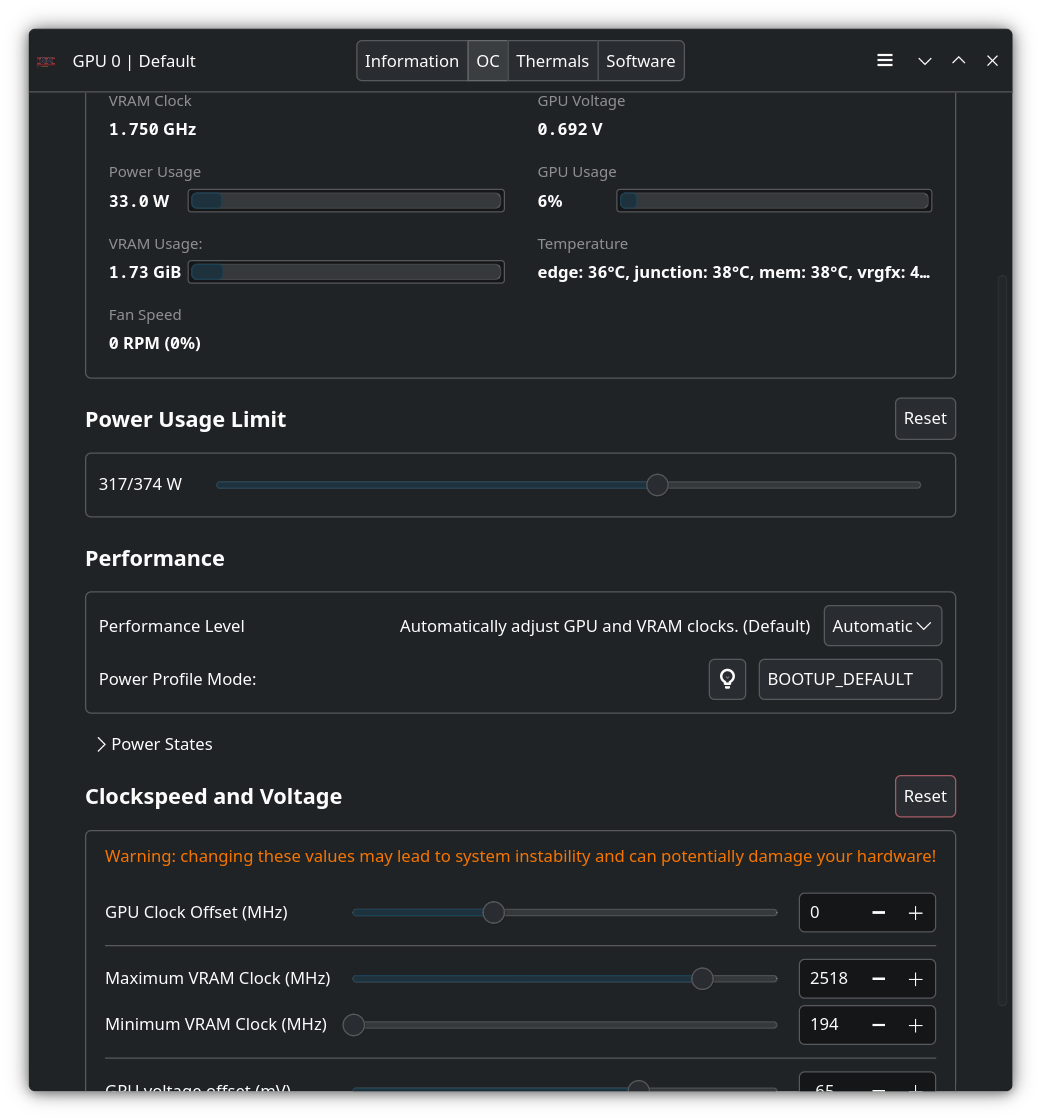
I never really needed to use MSI Afterburner for my 4090FE but is there anything that comes close to this for GPUs on arch? tuxunlocker? Greenwithenvy?
>>
File: file.png (110.5 KB)
110.5 KB PNG
108067533
I never really needed to use MSI Afterburner for my 4090FE, but is there anything that comes close to this for GPUs on Arch? What about TuxUnlocker? Greenwithenvy?
Use LACT
Process Lasso?
Linux doesn't need that.
As for the fan hub situation, I don't know — I just use the headers on my motherboard.
>>
>>108067565
Meant for >>108067533
>>
>>108067533
For optimizing the X3D cache on dual-ccd CPUs take a look at the CachyOS wiki:
https://wiki.cachyos.org/configuration/general_system_tweaks/#amd-3d-v -cache-optimizer
It should work on Arch.
>>
>>108064383
>Click on settings
>Scan my eyes to look at the thing I want
>Click on it
Versus
>Open terminal
>Search the web for what command you need to do a certain thing
>It's all contradictory forum advice telling completely different things, 1/3 of which hasn't worked in 20 years but still gets peddled, another 1/3 of which hasn't been the most efficient method in 20 years but still gets peddled, and another 1/3 is actually helpful
>Read all the documentation
>Memorise all the commands, regular expressions, and syntax
>Eventually figure out what to do
>Method breaks in the next update because the tooling changed
>>
What happened?
2016:
GNOME: 30.4
Xfce: 27.7
Plasma: 18.8
2021:
Plasma: 33.4
GNOME: 27.4
Xfce: 19.7
2026:
Plasma: 38.3
GNOME: 17.1
Xfce: 9.7
Also Plasma had a strange large jump in the past few months. It was at 34%, pretty stable for almost 5 years till the recent jump.
https://pkgstats.archlinux.de/fun/Desktop%20Environments/history
>>
>>108067659
GNOME is such a mess that even hardcore GNOMErs are switching to Plasma:
https://www.youtube.com/watch?v=w0FoC3PHRBs
>>
>>
>>108067659
>Also Plasma had a strange large jump in the past few months.
Literally the steamdeck made plasma more popular.
That and plasma wayland having more features that people needed compared to gnome.
Also there used to be more distros with XFCE than with plasma back in 2016 compared to now.
I like xfce i hope it manages to bounce back.
>>
>>
File: 1759850720187405.webm (234.4 KB)

234.4 KB WEBM
>>108067659
What makes you think usage statistics are a metric?
>>
>>
>>
>>
>>
>>
>>
>>
>>
>>
>>
>>
>>
>>
>>
>>
>>
File: file.png (90.8 KB)

90.8 KB PNG
>>108068055
If you want something for gaming just go with CachyOS, after install just click on pic related and you are ready to go.
>>
>>
>>108068075
Wouldnt recommend live cd mode just install a distro and try it out and if you really don't want to commit to something then try them out in a virtual machine first without the gaming part before choosing.
>>
>>108067659
>Plasma
KDE was an unstable mess between 2012 and 2020. KDE4 was clunky as fuck and early KDE5 was constantly >krashing. It unironically only got good a year before the Steam Deck was released.
>GNOME
I am surprised GNOME was actually that popular in 2016 considering people hated GNOME3 to the point that Unity, Mate, Cinnamon and Budgie were all made in response as "replacements".
>Xfce
Xfce is still stuck in 2010. I bet half it's users don't even want to use it but they themselves are stuck on hardware from 2010. There was also some drama where they moved to gtk3 in 2016/2017 and as a result people claimed it uses much more RAM and became useless as a "low resource usage" DE.
>>108067842
Not really. It's a pointless Ubuntu spin at this point which you'd only use if you wanted their experimental desktop environment. As the other anon said, it's better to just use a distro with KDE Plasma.
>>108068055
They're fine, yes. Gamers generally prefer Arch distros (Cachy, Manjaro) and sometimes Fedora distros (Nobara, Bazzite) because packages/drivers/dependencies are updated faster than Debian/Ubuntu distros. So game compatibility, performance improvements and GPU compatibility all get there first.
Some distros set things up for you out of the box. For example, CachyOS has this utility >>108068085, Nobara and Bazzite include some additional drivers for controllers and handhelds, they often come with Steam, etc.
>>108068075
Not really. A live USB mode often doesn't load in everything you'd have in a real environment and it won't represent the current state of the distro after you'd apply system updates.
>>
>>
>>
>>
>>
>>
>>
>>108067262
>6GHz access point
>6GHz
That would imply Wi-Fi 6 which sounds way too good to be true, I've had massive disappointments with Wi-Fi adapters.
What are some ways to verify all this Wi-Fi-nonsense?
>>108067436
Damn, guess I recommend Arch to everyone.
>>
>>108068145
Gnome devs (employed by redhat) are also the biggest wayland shills and were responsible for killing xorg to create wayland. So if you think gnome devs have malicious intent then that would apply to wayland as a whole as well.
>>
File: 4.10-slider-desktop.jpg (59.1 KB)

59.1 KB JPG
>>108067724
I use Plasma but I actually do like Xfce too and would use it over GNOME still.
I remember installing Ubuntu on my laptop as a kid and using Xfce for a while.
>our response???
Plasma and GNOME are pushed way harder these days than Xfce. With all the noobs coming to Linux Xfce isn't usually the first option listed and the Youtubers they watch dont talk about it. To a normie/noob entering Linux today the only real options for D/E are either GNOME, KDE, or Cinnamon.
>>
>>108068237
https://github.com/morrownr/USB-WiFi/blob/main/home/AP_Mode/Bridged_Wi reless_Access_Point.md
AP mode conf for MediaTek 7925:
https://github.com/morrownr/USB-WiFi/blob/main/home/AP_Mode/hostapd-Wi Fi7.conf
>>
>>108068243
GNOME was always the thing being pushed. Ubuntu and Fedora still use it by default and Ubuntu possibly still has the supermajority of users. The reason why Plasma is being pushed is because it's finally good and blows everything out of the water.
>>
>>108068243
Yeah i like XFCE as well and prefer it over plasma. I've been trying out plasma but it really just isn't the same as XFCE.
>To a normie/noob entering Linux today the only real options for D/E are either GNOME, KDE, or Cinnamon.
Technically XFCE is also an option since most distros still have an XFCE spin it just doesnt get much exposure anymore.
I don't think cinnamon was ever an option its just mint is popular and cinnamon is their flagship desktop.
>>
>>
>>108068307
>>108068243
The problem with Xfce is it just looks like shit by default. Mint and Manjaro do a decent job at styling it properly, but someone trying out Xubuntu will look at it and think "the fuck is this 2001 OSX 10 looking interface?" and just hop to a different distro. People moving to Linux nowadays have different UI/UX standards and Xfce fails to meet them. Even GNOME does a better job.
>>
I'm having audio problems on floorp (firefox), it doesn't get audio from my microphone. I get audio output just fine, I can listen to whatever, just no input from the mic. The microphone works on other software (tested on OBS studio).
>>
Hello
Today I was downloading some updates to Linux mint while downloading some shit on steam. Because I was trying to figure out why Code Vein wouldn't work even though it worked before. But steam download failed before it finished claiming I have no space on root after which I tried to verify that claim but noticed all my disks are read only for some reason. So I tried restarting. Now Linux doesn't start properly. I can get into grub but when I tried to run Linux the mint logo appears but after that instead of login screen it goes back to motherboard logo which displays seemingly indefinitely. I can also go into advanced options if that helps, but I have no idea what to do there. I have a habit of never shutting down computer and just using suspend option if that helps. One of the disks I have plugged in still has windows on it in inoperable state. Please help, and please explain like I am retarded, I am a casual user of linux. Please
>>
>>108068725
>all my disks are read only for some reason
Normally when an SSD or any flash memory goes "read only" it means it's fucked. You'll have to live boot from a USB device to troubleshoot what actually happened and see if you can fix it. And if your storage really did break you'll need to buy a new SSD.
>>
>>108068389
The stock default is shit but 100% of people just have it look like vista with the whisker menu including all the distros that have an xfce spin such as xubuntu so the defaults dont matter and have nothing to do with peoples impressions.
>>
>>
>>
>>108068725
Same problem today on my Ubuntu 24.04. There is something seriously broken in Linux Kernel 6.17 my Ubuntu updated to.
I don't have Steam or anything, it just happens with heavy write on disk or "apt update" - then it fails and disk is now "read-only". I thought at first my SSD is dying, but it's only 4 months old. So, for now I resolved this by roll back to kernel 6.14
Fuck Ubuntu.
>>
>>108069131
This is how I solved this.
In grub menu select "advanced", boot in safe mode, run "fsck -fy /dev/sda1" or whatever is your drive called. When it's done press ctrl+alt+del to reboot, then in grub menu select older kernel 6.14. It booted fine on my machine, so I then uninstalled kernel 6.17 and disabled future automatic updates.
>>
>>
>>

>>